Contenu source (brut)
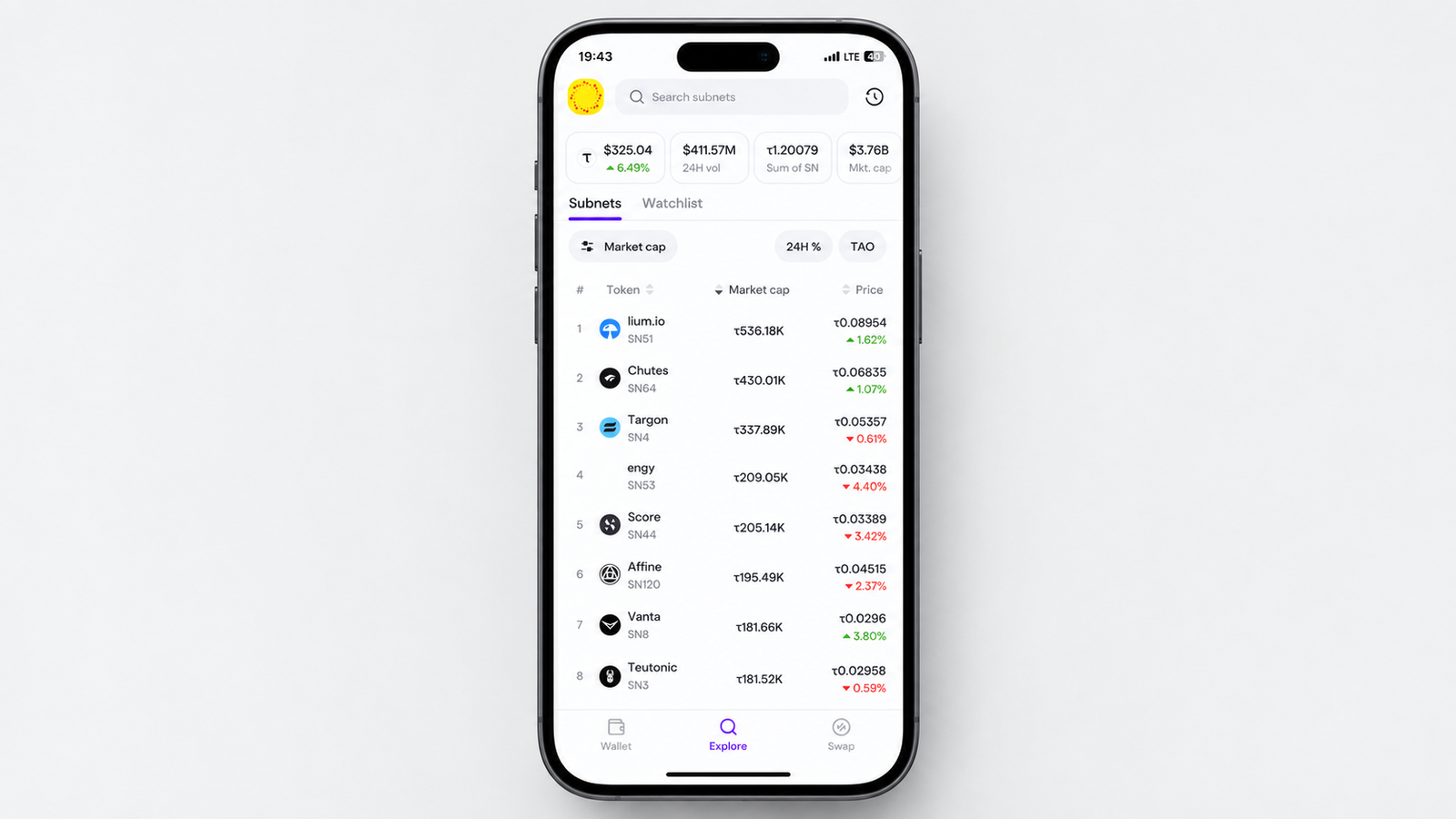
<p class="wp-block-paragraph"><a href="https://taodaily.io/tao-com-connects-ethereum-capital-to-bittensor-subnets-with-cross-chain-swaps/">TAO.com</a> has rolled out an updated <strong>Explore</strong> view that brings TAO and subnet tokens into one place, making it easier to discover assets, monitor prices, and track portfolio activity.</p>
<figure class="wp-block-image size-large is-resized"><img loading="lazy" decoding="async" width="1024" height="478" src="https://taodaily.io/wp-content/uploads/2026/09/image-268-1024x478.png" alt="" class="wp-image-25071" style="aspect-ratio:2.136986301369863;width:624px;height:auto" srcset="https://taodaily.io/wp-content/uploads/2026/09/image-268-1024x478.png 1024w, https://taodaily.io/wp-content/uploads/2026/09/image-268-300x140.png 300w, https://taodaily.io/wp-content/uploads/2026/09/image-268-767x358.png 767w, https://taodaily.io/wp-content/uploads/2026/09/image-268.png 1910w" sizes="(max-width: 1024px) 100vw, 1024px" /><figcaption class="wp-element-caption"><a href="https://www.tao.com/tokens">TAO.com’ Explore View on Desktop</a></figcaption></figure>
<p class="wp-block-paragraph">Available across <strong>iPhone, Android, and the web</strong>, the redesigned section combines token discovery, live charts, watchlists, portfolio history, and transaction filters in a single interface.</p>
<p class="wp-block-paragraph">For Bittensor users tracking multiple subnets, the update provides a simpler way to keep an eye on the tokens that matter most.</p>
<h2 class="wp-block-heading">How to Access Explore</h2>
<p class="wp-block-paragraph">Open the <strong>TAO.com</strong> app on your mobile device or visit the platform through your browser. From there, navigate to the <strong>Explore</strong> or <strong>Tokens</strong> section. The page presents <strong>TAO alongside subnet tokens</strong>, giving users a unified view of the available assets.</p>
<p class="wp-block-paragraph">1. <strong>Search and Discover Subnet Tokens</strong></p>
<p class="wp-block-paragraph">The Explore section includes a search function for finding specific TAO and subnet tokens. Users can browse the available assets, open individual token pages, and compare tokens from the main Explore interface.</p>
<figure class="wp-block-image size-large is-resized"><img loading="lazy" decoding="async" width="1024" height="483" src="https://taodaily.io/wp-content/uploads/2026/09/image-269-1024x483.png" alt="" class="wp-image-25072" style="aspect-ratio:2.1152542372881356;width:624px;height:auto" srcset="https://taodaily.io/wp-content/uploads/2026/09/image-269-1024x483.png 1024w, https://taodaily.io/wp-content/uploads/2026/09/image-269-300x141.png 300w, https://taodaily.io/wp-content/uploads/2026/09/image-269-766x361.png 766w, https://taodaily.io/wp-content/uploads/2026/09/image-269.png 1882w" sizes="(max-width: 1024px) 100vw, 1024px" /><figcaption class="wp-element-caption">Discover Tokens on TAO.com</figcaption></figure>
<p class="wp-block-paragraph">2. <strong>Monitor Prices With Live Charts</strong></p>
<p class="wp-block-paragraph">TAO.com has also updated its token charts to refresh automatically while users browse. On the <strong>24-hour chart</strong>, the latest data point refreshes approximately every <strong>10 to 15 seconds</strong> without requiring a manual page reload.</p>
<figure class="wp-block-image size-large is-resized"><img loading="lazy" decoding="async" width="1024" height="660" src="https://taodaily.io/wp-content/uploads/2026/09/image-266-1024x660.png" alt="" class="wp-image-25069" style="aspect-ratio:1.5483870967741935;width:624px;height:auto" srcset="https://taodaily.io/wp-content/uploads/2026/09/image-266-1024x660.png 1024w, https://taodaily.io/wp-content/uploads/2026/09/image-266-300x193.png 300w, https://taodaily.io/wp-content/uploads/2026/09/image-266-768x495.png 768w, https://taodaily.io/wp-content/uploads/2026/09/image-266.png 1197w" sizes="(max-width: 1024px) 100vw, 1024px" /><figcaption class="wp-element-caption"><a href="https://www.tao.com/tao">TAO Chart on TAO.com</a></figcaption></figure>
<p class="wp-block-paragraph"><strong>Users can switch between available time ranges</strong> while viewing price movements, with USD and TAO price changes displayed consistently across the different periods. The same live chart functionality is available when viewing tokens through the portfolio interface.</p>
<p class="wp-block-paragraph">3. <strong>Create a Personal Watchlist</strong></p>
<p class="wp-block-paragraph">Users can add tokens to a watchlist directly from their individual details pages. The feature supports <strong>TAO, Root, and subnet tokens</strong>, allowing users to keep frequently monitored assets together.</p>
<figure class="wp-block-image size-large is-resized"><img loading="lazy" decoding="async" width="1024" height="485" src="https://taodaily.io/wp-content/uploads/2026/09/image-270-1024x485.png" alt="" class="wp-image-25074" style="aspect-ratio:2.108108108108108;width:624px;height:auto" srcset="https://taodaily.io/wp-content/uploads/2026/09/image-270-1024x485.png 1024w, https://taodaily.io/wp-content/uploads/2026/09/image-270-300x142.png 300w, https://taodaily.io/wp-content/uploads/2026/09/image-270-766x363.png 766w, https://taodaily.io/wp-content/uploads/2026/09/image-270.png 1883w" sizes="(max-width: 1024px) 100vw, 1024px" /><figcaption class="wp-element-caption"><a href="https://www.tao.com/token/51?to=SN51">Click on ‘Add to Waitlist’</a></figcaption></figure>
<p class="wp-block-paragraph">Once tokens have been added, open the <strong>Watchlist</strong> tab to view them in one place. This can be useful for users following several subnets and wanting quicker access to their latest market data.</p>
<figure class="wp-block-image size-large is-resized"><img loading="lazy" decoding="async" width="1024" height="297" src="https://taodaily.io/wp-content/uploads/2026/09/image-267-1024x297.png" alt="" class="wp-image-25070" style="aspect-ratio:3.447513812154696;width:624px;height:auto" srcset="https://taodaily.io/wp-content/uploads/2026/09/image-267-1024x297.png 1024w, https://taodaily.io/wp-content/uploads/2026/09/image-267-300x87.png 300w, https://taodaily.io/wp-content/uploads/2026/09/image-267-765x222.png 765w, https://taodaily.io/wp-content/uploads/2026/09/image-267.png 1902w" sizes="(max-width: 1024px) 100vw, 1024px" /><figcaption class="wp-element-caption">TAO.com’s Waitlist</figcaption></figure>
<p class="wp-block-paragraph">4. <strong>Track Portfolio History More Accurately</strong></p>
<p class="wp-block-paragraph">TAO.com has also changed how historical USD portfolio values are calculated. Previously, portfolio charts could apply the current TAO price across historical periods.</p>
<figure class="wp-block-image size-large is-resized"><img loading="lazy" decoding="async" width="1024" height="481" src="https://taodaily.io/wp-content/uploads/2026/09/image-271-1024x481.png" alt="" class="wp-image-25073" style="aspect-ratio:2.1296928327645053;width:624px;height:auto" srcset="https://taodaily.io/wp-content/uploads/2026/09/image-271-1024x481.png 1024w, https://taodaily.io/wp-content/uploads/2026/09/image-271-300x141.png 300w, https://taodaily.io/wp-content/uploads/2026/09/image-271-766x360.png 766w, https://taodaily.io/wp-content/uploads/2026/09/image-271.png 1898w" sizes="(max-width: 1024px) 100vw, 1024px" /><figcaption class="wp-element-caption"><a href="https://www.tao.com/portfolio">Connect Wallet to View Holdings ‘Portfolio’ Tab</a></figcaption></figure>
<p class="wp-block-paragraph">The updated system uses the <strong>exchange rate recorded at each historical point</strong>, producing a more accurate representation of how the portfolio value changed over time.</p>
<p class="wp-block-paragraph">5. <strong>Filter Transaction History</strong></p>
<p class="wp-block-paragraph">Transaction history can now be filtered across several time periods. Op